Python入门

正则表达式示例

1
2
3
4
5
6
7
8
9
10
11
12
13
14
15
16
17
18
19
20
21
22
23
24
25
26
27
28
29
30
31
32
33
34
35
36
37
38
39
40
41
42
43
44
45
46
47
48
49
50
51
52
53
54
55
56
57
58
59
60
61
62
63
64
65
66
67
68
69
70
71
72
73
74
75
76
77
78
79
80
81
82
83
84
85
86
87
88
89
90
91
92
93
94
95
96
97
98
99
100
101
102
103
104
105
106
107
108
109
110
111
112
113
114
115
116
117
118
119
120
121
122
123
124
125
126
127
128
129
130
131
132
133
134
135
136
137
138
139
140
141
142
143
144
145
146
147
148
149
150
151
152
153
154
155
156
157
158
159
160
161
// main.dart

import 'package:flutter/material.dart';

void main() {
debugPrint("1313");
// runApp(const MyApp());

debugPrint("--------1----------");
debugPrint(RegUtil.convert1('# abcd'));
debugPrint(RegUtil.convert1('## abcd'));
// debugPrint(RegUtil.convert1('# abcd\n## efgh'));

debugPrint("--------2----------");
debugPrint(RegUtil.convert2("# [[abcd]]"));
debugPrint(RegUtil.convert2("## [[abcd]]"));
debugPrint(RegUtil.convert2("### [[lmn]]"));

debugPrint("--------3----------");
debugPrint(RegUtil.convert3("abcd\"*lmn")); // todo

debugPrint("--------4----------");
debugPrint(RegUtil.convert4(
"Introducing ChatGPT We've trained (a model) called #ChatGPT which interacts in a (conversational way). The # dialogue format makes it possible for ChatGPT to answer followup questions, admit its mistakes, challenge incorrect premises, and reject inappropriate requests."));

debugPrint("--------5----------");
debugPrint(
RegUtil.convert5("你的好朋友\$张三\$发来⼀个地址\$https://www.google.com\$,你想要打开吗?")
.toString());
debugPrint(
RegUtil.convert5("你的好朋友\$李四\$发来⼀个地址\$http://www.google.com\$,你想要打开吗?")
.toString());
}

class RegUtil {
// convert "# abcd" to "# [[abcd]]"
// convert "## abcd" to "## [[abcd]]"
static String convert1(String text) {
final pattern = RegExp(r'^(#+) (.+)$', multiLine: true);
return pattern.allMatches(text).fold('', (result, match) {
final level = match.group(1);
final content = match.group(2)?.trim();
return '$result$level [[$content]]\n';
});
}

// convert "# [[abcd]]" to "# abcd"
// convert "## [[abcd]]" to "# abcd"
// convert "### [[lmn]]" to "# lmn
static String convert2(String text) {
final pattern = RegExp(r'^#+ \[\[(.+)\]\]$', multiLine: true);
return pattern.allMatches(text).fold('', (result, match) {
if (match.group(0) == null) {
return '';
}
// final level = '#' * match.group(0)!.indexOf(' ');
const level = '#';
final content = match.group(1);
return '$result$level $content\n';
});
}

// convert `abcd"*lmn` to `abcd'lmn.com`
static String convert3(String text) {
text = 'abcd"*lmn';

String output = text.replaceAll(RegExp('"'), "'");
output = output.replaceAll(RegExp(r'\*'), "");
output += ".com";
return output;
}

static String convert32(String input) {
RegExp pattern = RegExp(r'"\*([\w]+)');
String? output = pattern.stringMatch(input);
if (output == null) {
return input;
}
output = output.replaceAll('"', '\''); // 将双引号替换为单引号
output = output.replaceAll('*', ''); // 去掉星号
output += '.com'; // 添加 .com 后缀
return input.replaceAll(pattern, output);
}

// 输出 "a model"
// 怎么获取 trained (a model) in a (conversational way). The 中的a model,但不会获取到conversational way,用dart语言和正则。
// 即我希望获取()中的字符,但如果这些字符所在的()的前面有多个空格就不要(提取的是括号中的内容,但只想要获取前面没有多个空格的内容)
static String convert4_1(String text) {
// RegExp regex = RegExp(r'(?:\(|#)\s*(\w+(?:\s+\w+)*)\)');
// RegExp regex = RegExp(r'(?:\()\s*(\w+(?:\s+\w+)*)\)');
// Iterable<Match> matches = regex.allMatches(text);
// List<String?> results = matches.map((match) {
// final level = match.group(1);
// // final content = match.group(2)?.trim();
// return '$level';
// }).toList();

String text = "trained (a model) in a (conversational way). The";
RegExp regExp = RegExp(r"\(\s*(?<!\s{2,}).*?\s*\)");
Iterable<Match> matches = regExp.allMatches(text);
String word = "";
for (Match match in matches) {
String matchWord = match.group(0) ?? '';
word = matchWord.trim().substring(1, matchWord.length - 1);
break;
}
debugPrint(word);
return word;
}

// 输出 "ChatGPT"
// 怎么获取 The # dialogue format makes #ChatGPT it 中的ChatGPT,但不会获取到dialogue,用dart语言和正则。
// 即我希望获取#后的单词,但如果这个单词和#号之间有空格,就不要
static String convert4_2(String text) {
// String text = "The # dialogue format makes #ChatGPT it";
RegExp regExp = RegExp(r"#\s*(\w+)\b");
Iterable<Match> matches = regExp.allMatches(text);
String word = "";
for (Match match in matches) {
String matchWord = match.group(1) ?? '';
if (!matchWord.contains(" ")) {
word = matchWord;
break;
}
}
debugPrint(word);
return word;
}

// conversational way is invalid since there are more than 1 space before it, dialogure is invalid since there is a space after #
static String convert4(String text) {
// String text = "trained (a model) in a (conversational way). The # dialogue format makes #ChatGPT it";
RegExp regExp = RegExp(r"\((\s*(?<!\s{2,}).*?\s*)\)|#\s*(\w+)\b");
List<String> array = [];
Iterable<Match> matches = regExp.allMatches(text);
for (Match match in matches) {
if (match.group(1) != null) {
String model = match.group(1)!.trim();
array.add(model);
}
if (match.group(2) != null) {
String word = match.group(2) ?? '';
array.add(word);
break;
}
}

return array.toString();
}

static String convert5(String text) {
RegExp nameRegex = RegExp(r'\$(.*?)\$');
RegExp urlRegex = RegExp(r'https?://(?:[-\w.]|(?:%[\da-fA-F]{2}))+');
String? name = nameRegex.stringMatch(text)?.replaceAll('\$', '');
String? url = urlRegex.stringMatch(text);

Map<String, dynamic> friend = {"name": name, "url": url};

return friend.toString();
}
}

JS语言的实现如下:

1
2
3
4
5
6
7
8
9
10
11
12
13
14
15
16
17
18
19
20
21
22
23
24
25
26
27
28
29
30
31
32
33
34
35
36
37
38
39
40
41
42
43
44
45
46
47
48
49
50
51
52
53
54
55
56
57
58
59
60
61
62
63
64
65
66
67
68
69
70
71
72
73
74
75
76
77
<!DOCTYPE html>
<html>
<head>
<meta charset="utf-8">
<title>菜鸟教程(runoob.com)</title>
</head>
<body>

<script>


var str = "abcd test@runoo3b.com 1234";
var patt1 = /\b[\w.%+-]+@[\w.-]+\.[a-zA-Z]{2,6}\b/g;
document.write(str.match(patt1));

function convert1(text) {
const pattern = /^(#+) (.+)$/gm;
return text.replace(pattern, function(match, p1, p2) {
const level = p1;
const content = p2.trim();
return level + ' [[' + content + ']]\n';
});
}

function convert2(text) {
const pattern = /^#+ \[\[(.+)\]\]$/gm;
return text.replace(pattern, function(match, p1) {
const level = '#';
const content = p1;
return level + ' ' + content + '\n';
});
}

function convert3(text) {
let output = text.replaceAll('"', "'");
output = output.replaceAll('\*', "");
output += ".com";
return output;
}

function convert4(text) {
const regExp = /\((\s*(?<!\s{2,}).*?\s*)\)|#\s*(\w+)\b/g;
const array = [];
let matches = text.matchAll(regExp);
for (let match of matches) {
if (match[1] !== undefined) {
let model = match[1].trim();
array.push(model);
}
if (match[2] !== undefined) {
let word = match[2];
array.push(word);
break
}
}
return array.toString();
}

function convert5(text) {
const nameRegex = /\$(.*?)\$/;
const urlRegex = /https?:\/\/(?:[-\w.]|(?:%[\da-fA-F]{2}))+/;
let name = nameRegex.exec(text)?.[1].replace(/$/g, '');
let url = urlRegex.exec(text)?.[0];
let friend = {"name": name, "url": url};
return JSON.stringify(friend);
}


document.write(convert1("# abcd"));
document.write(convert2("# [[abcd]]"));
document.write(convert3('abcd"*lmn'));
document.write(convert4("Introducing ChatGPT We've trained (a model) called #ChatGPT which interacts in a (conversational way). The # dialogue format makes it possible for ChatGPT to answer followup questions, admit its mistakes, challenge incorrect premises, and reject inappropriate requests."));
document.write(convert5("你的好朋友\$张三\$发来⼀个地址\$https://www.google.com\$,你想要打开吗?"));
</script>

</body>
</html>
1
2
3
4
5
6
7
8
9
10
11
12
13
14
15
16
17
18
19
20
21
22
23
24
25
26
27
28
29
30
31
32
33
34
35
36
37
38
39
40
41
42
43
44
45
46
47
48
49
50
51
52
53
54
55
56
57
58
59
60
61
62
63
64
65
66

function convert1(text) {
const pattern = /^(#+) (.+)$/gm;
return text.replace(pattern, function(match, p1, p2) {
const level = p1;
const content = p2.trim();
return level + ' [[' + content + ']]';
});
}

function convert2(text) {
const pattern = /^#+ \[\[(.+)\]\]$/gm;
return text.replace(pattern, function(match, p1) {
const level = '#';
const content = p1;
return level + ' ' + content ;
});
}

function convert3(text) {
if (typeof text != 'string') {
return "";
}
let output = text.replace(/"/g, "'");
output = output.replace(/\*/g, "");

output += ".com";
return output;
}

function convert4(text) {
const regExp = /\((\s*(?<!\s{2,}).*?\s*)\)|#\s*(\w+)\b/g;
const array = [];
let matches = text.matchAll(regExp);
for (let match of matches) {
if (match[1] !== undefined) {
let model = match[1].trim();
array.push(model);
}
if (match[2] !== undefined) {
let word = match[2];
array.push(word);
break
}
}
return array.toString();
}

function convert5(text) {
const nameRegex = /\$(.*?)\$/;
const urlRegex = /https?:\/\/(?:[-\w.]|(?:%[\da-fA-F]{2}))+/;

let name = nameRegex.exec(text) ? nameRegex.exec(text)[1].replace(/\$/g, '') : null;
let url = urlRegex.exec(text) ? urlRegex.exec(text)[0] : null;

let friend = {"name": name, "url": url};
return JSON.stringify(friend);
}


console.log(convert1("# abcd"));
console.log(convert2("# [[abcd]]"));
console.log(convert3('abcd"*lmn'));
console.log(convert4("Introducing ChatGPT We've trained (a model) called #ChatGPT which interacts in a (conversational way). The # dialogue format makes it possible for ChatGPT to answer followup questions, admit its mistakes, challenge incorrect premises, and reject inappropriate requests."));
console.log(convert5("你的好朋友\$张三\$发来⼀个地址\$https://www.google.com\$,你想要打开吗?"));

Ruby入门

Ruby

一、安装/升级Ruby

查看Ruby版本

1
2
% ruby -v # 或 ruby --version
ruby 3.1.1p18 (2022-02-18 revision 53f5fc4236) [x86_64-darwin21]

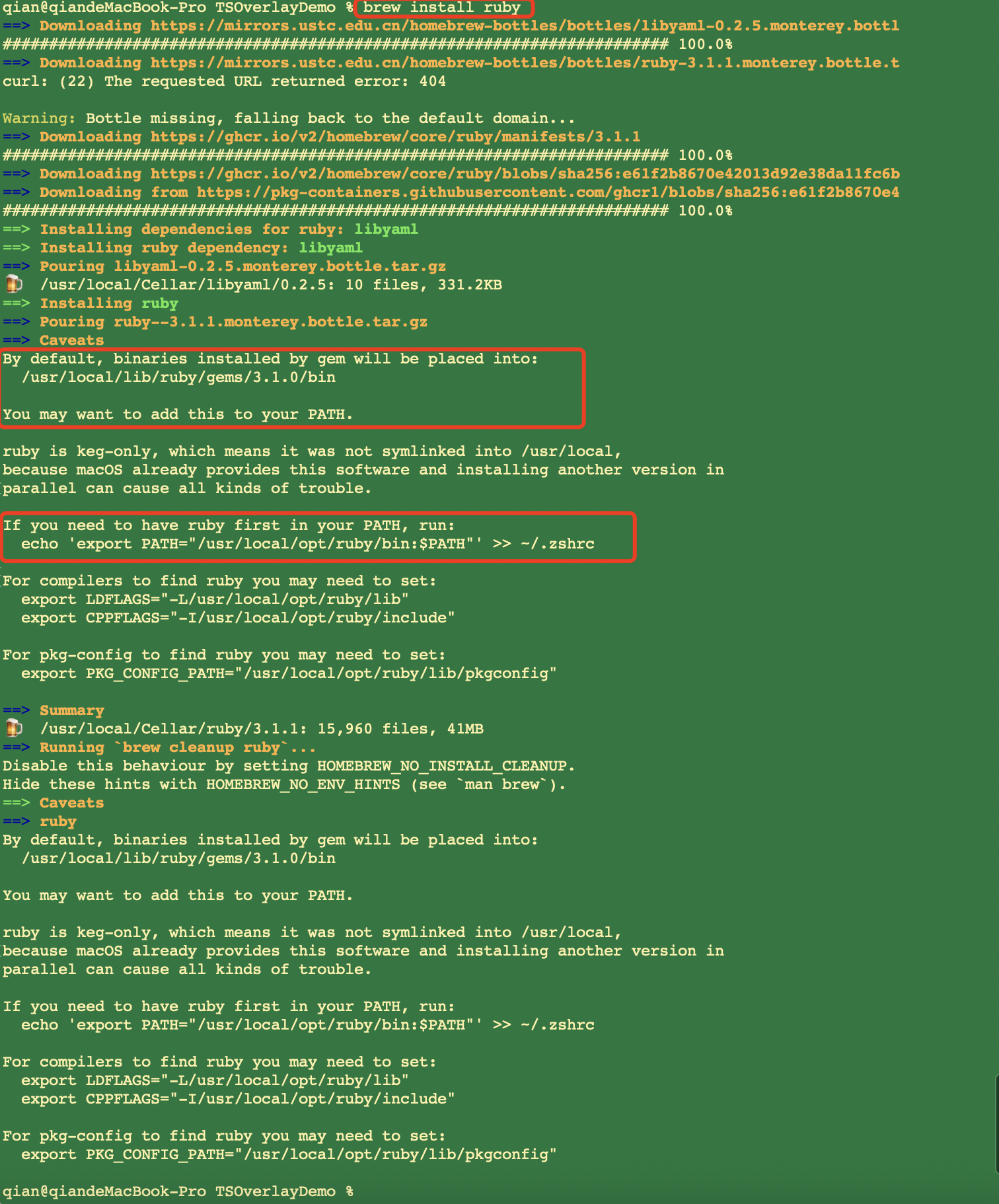
安装/升级Ruby

image-20220427000442104

1
2
3
4
5
6
7
8
# 1、打开环境变量配置文件
open ~/.zshrc

# 2、在文件中添加一行以下配置
export PATH="/usr/local/opt/ruby/bin:$PATH"

# 3、让环境变量生效
source ~/.zshrc

先看Ruby参考里面对eval和binding的解释:

eval(expr[, binding[, fname[, lineno=1]]])

​ 把字符串expr当作Ruby程序来运行并返回其结果。

binding

​ 生成并返回Binding对象。该对象包含变量、方法等的环境信息,它通常用作Eval的第二参数。

Flutter的设计模式

一、单例

参照SharedPreferences

1
2
3
4
5
6
7
8
9
10
11
12
13
14
15
16
17
18
19
20
class SharedPreferences {
SharedPreferences._(this._preferenceCache);

static const String _prefix = 'flutter.';
static SharedPreferences _instance;
static Future<SharedPreferences> getInstance() async {
if (_instance == null) {
final Map<Object, Object> fromSystem =
await _kChannel.invokeMethod('getAll');
assert(fromSystem != null);
// Strip the flutter. prefix from the returned preferences.
final Map<String, Object> preferencesMap = <String, Object>{};
for (String key in fromSystem.keys) {
assert(key.startsWith(_prefix));
preferencesMap[key.substring(_prefix.length)] = fromSystem[key];
}
_instance = SharedPreferences._(preferencesMap);
}
return _instance;
}

创建一个单例的Manager类

1
2
3
4
5
6
7
8
9
10
11
12
13
14
15
16
class Manager {
// 工厂模式
factory Manager() =>_getInstance();
static Manager get instance => _getInstance();

static Manager _instance;
Manager._internal() {
// 初始化
}
static Manager _getInstance() {
if (_instance == null) {
_instance = new Manager._internal();
}
return _instance;
}
}

调用

1
2
3
// 无论如何初始化,取到的都是同一个对象
Manager manager = new Manager();
Manager manager2 = Manager.instance;

终端命令安装

How to install apt-get or YUM on Mac OS X

参考文章:How to install apt-get or YUM on Mac OS X

如果要在Mac OS X上安装apt-get或yum类似的软件,你有两种选择:

  1. Homebrew:http://brew.sh
  2. Macports:http://www.macports.org

安装了上面的程序之后(一个就行),您可以使用brew install PACKAGE_NAMEport install PACKAGE_NAME安装可用的软件包。

rpm -qa |grep yum
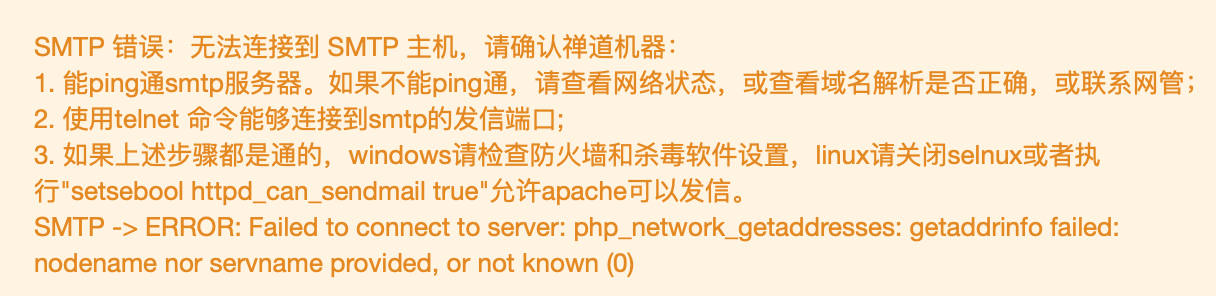
Zentao发送邮件问题的终端检测

image-20190305171822375

-bash: rpm: command not found

brew install rpm

-bash: yum: command not found

Mac OS X是基于Unix的,它可以使用非常多Linux平台上开源的优秀工具,比如wget,比如dos2unix脚本工具等。
但是OS X系统本身却缺少Linux下得包管理器。比如Fedora的yum与dnf,比如Ubuntu的apt-get,比如ArchLinux的Pacman等。是这些优秀的开源软件在Mac上的安装只能通过下载源码,编译,安装,配置环境变量的步骤来完成安装。对于大部分的软件,在安装过程中是需要很多的依赖库的,手动去解决这些依赖库是十分痛苦的事情。包管理器干的就是这样的事情:解决软件安装过程中的依赖关系。
有一个开源的项目叫Homebrew,完美解决了Mac OS X上没有包管理器的尴尬。
参考文档:为什么要使用Homebrew

Mac下自己试的是无法安装yum,相应的yum install,改为了brew install。

image-20190305171015368

Zentao问题整理

一、Zentao的安装

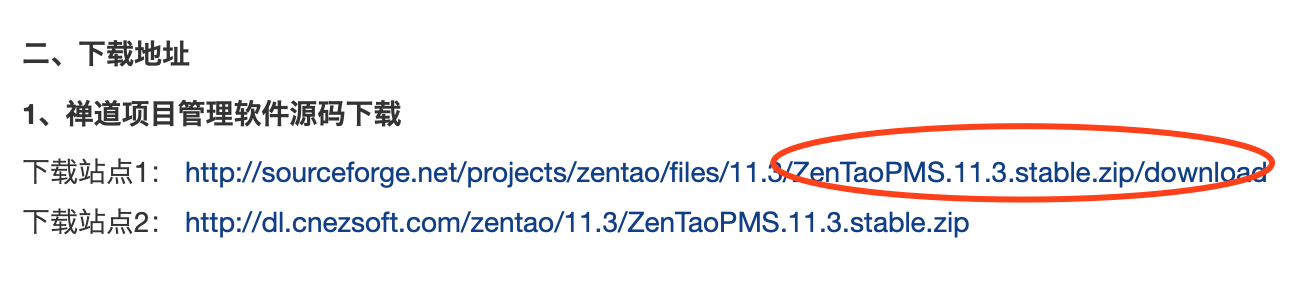
请到https://www.zentao.net下载开源版

如:image-20190305105851487

在浏览器中访问项目地址:http://localhost/zentaopms/www/index.php,进入系统安装程序,点击开始安装。

二、Zentao访问问题

1、访问问题

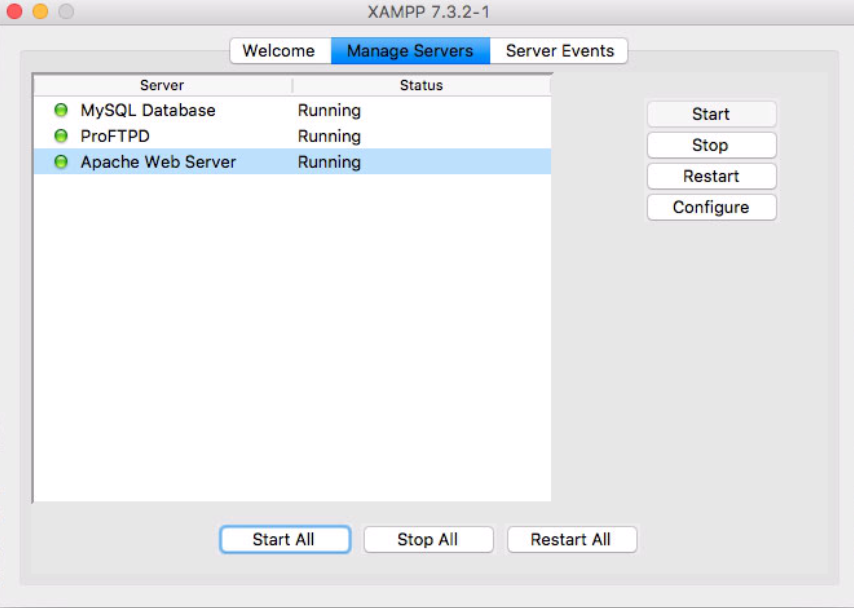
请确保你的服务器是打开的,比如你使用的是XAMPP

Zentao的XAMPP

2、Zentao访问问题:Unknown database ‘zentao’

问题描述如下截图:

image-20190305102934706

原因是:http://localhost/phpmyadmin/下原本的zentao数据库缺失了,即原本的应该是有如下的zentao数据库的。
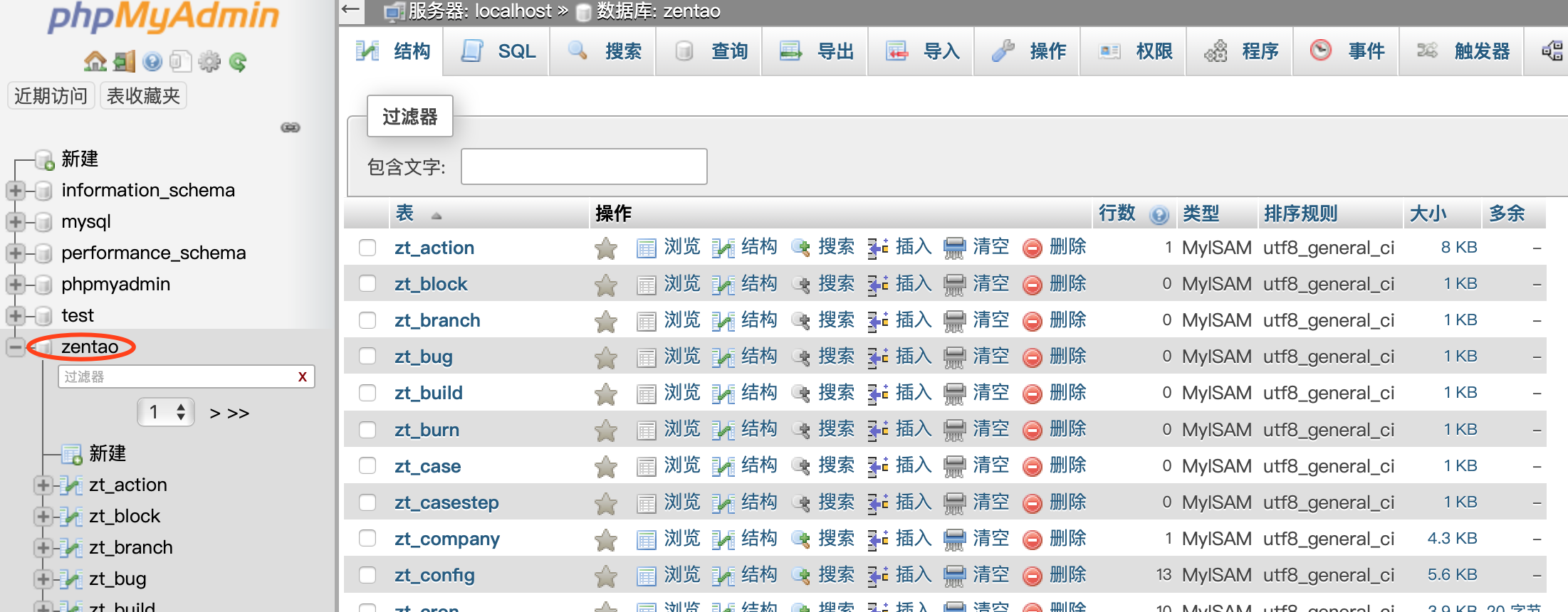
image-20190305102829575

或者你也可以看到xamppfiles\var\mysql下缺少了zentao数据库文件夹了,有的时候是如下样子的:
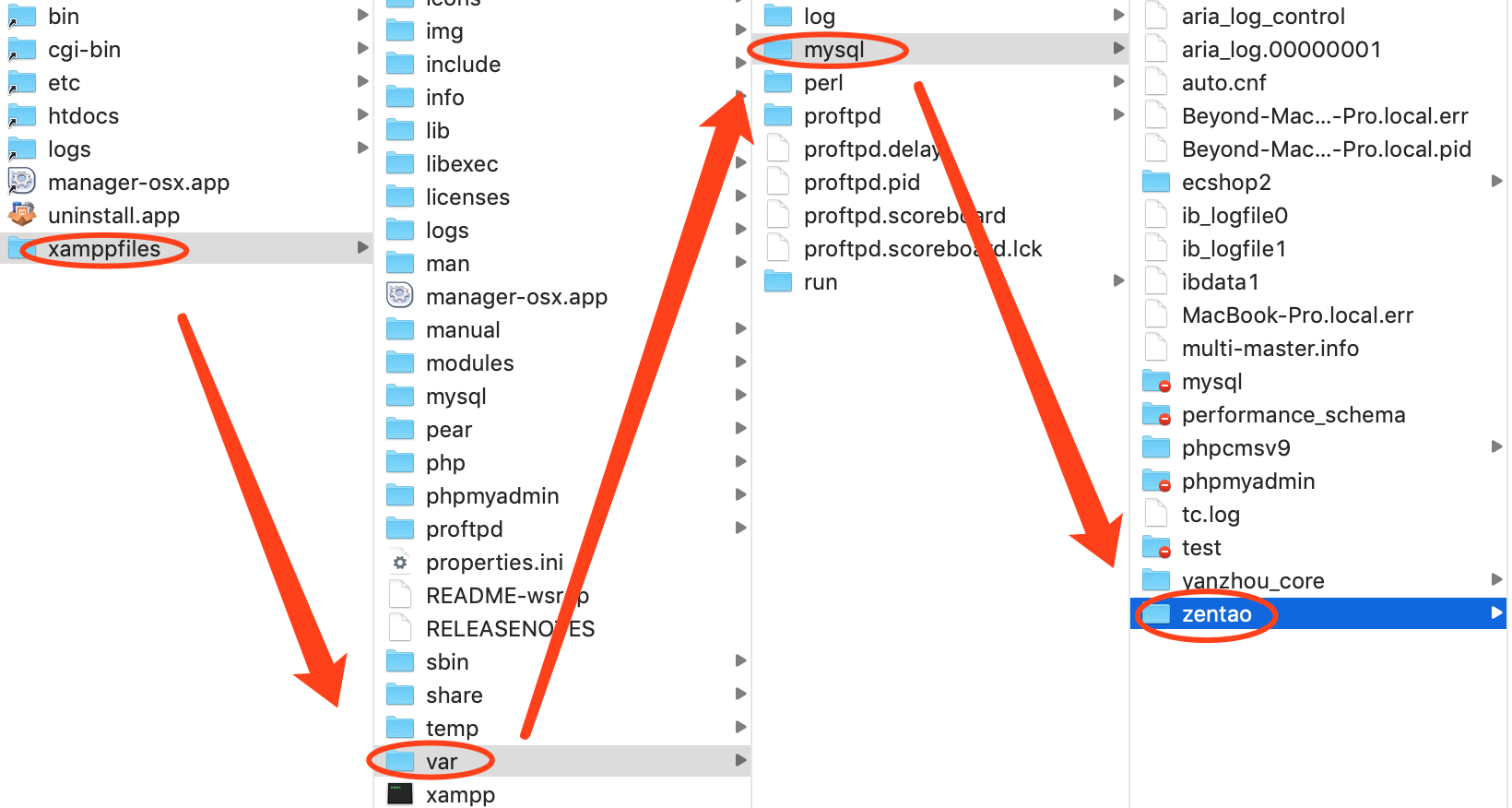
image-20190305104603201

解决办法:赋值一份原本的到xamppfiles\var\mysql下,或者你重新安装禅道吧。

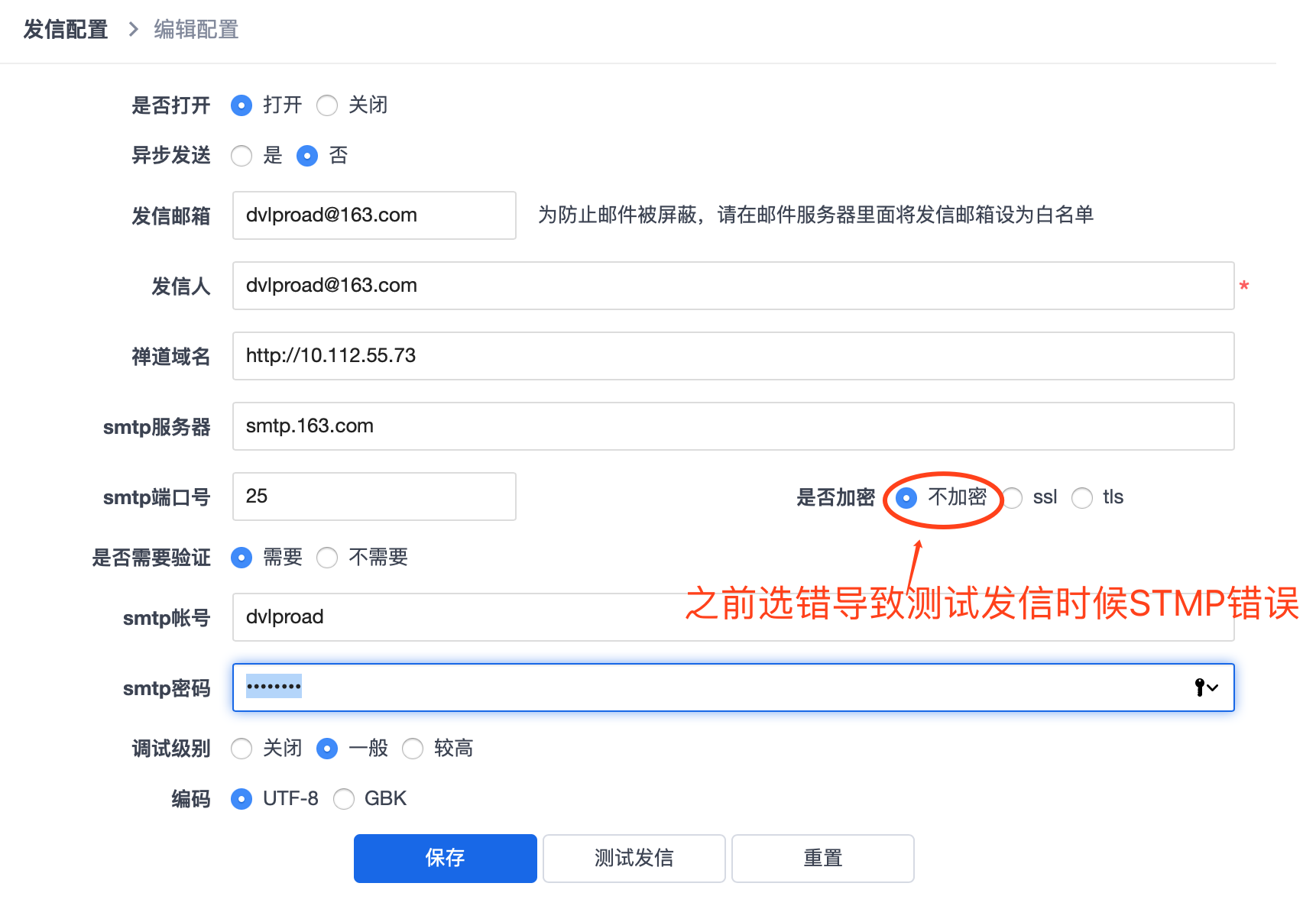
三、如何配置email发信

请参考官网操作:官网:如何配置email发信

附:

1
2
我的网易授权码是`Auth0987`、
QQ邮箱授权码`**nazr****mrbz****naox****bbhg**`即nazr mrbz naox bbhg

image-20190305173747142

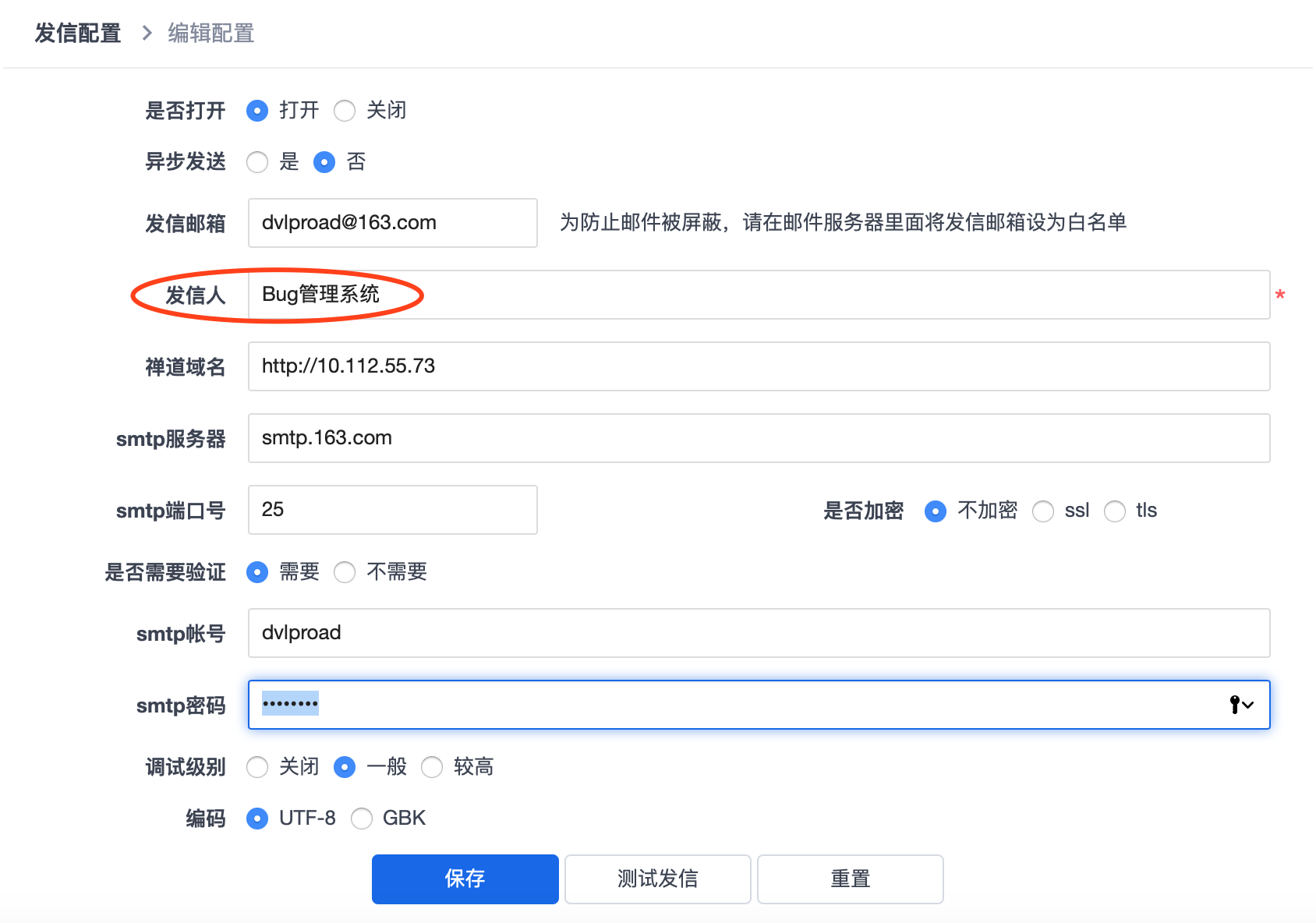
为看起来更好,你可以更改发信人

image-20190305174930068

四、备份禅道

备份禅道:https://www.zentao.net/book/zentaopmshelp/42.html

XAMPP问题整理

一、XAMPP 下载地址

点击进入:XAMPP 下载地址

XAMPP 下载地址1

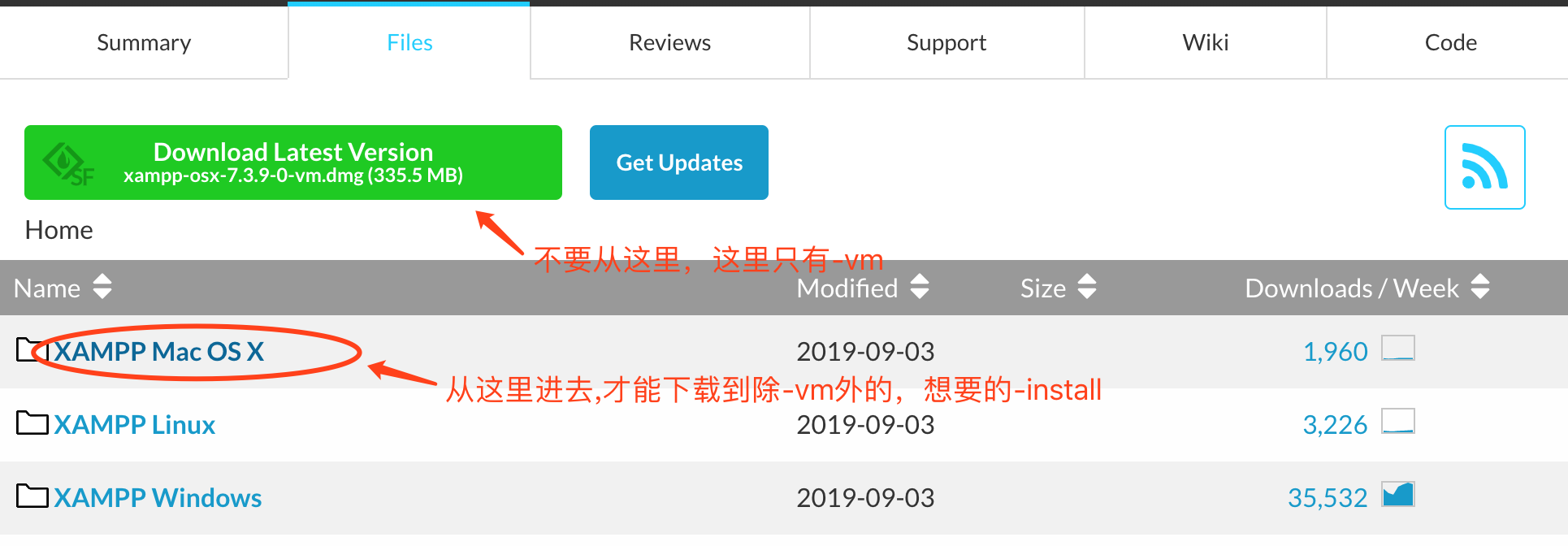
进入后的页面如下

image-20190304181710320

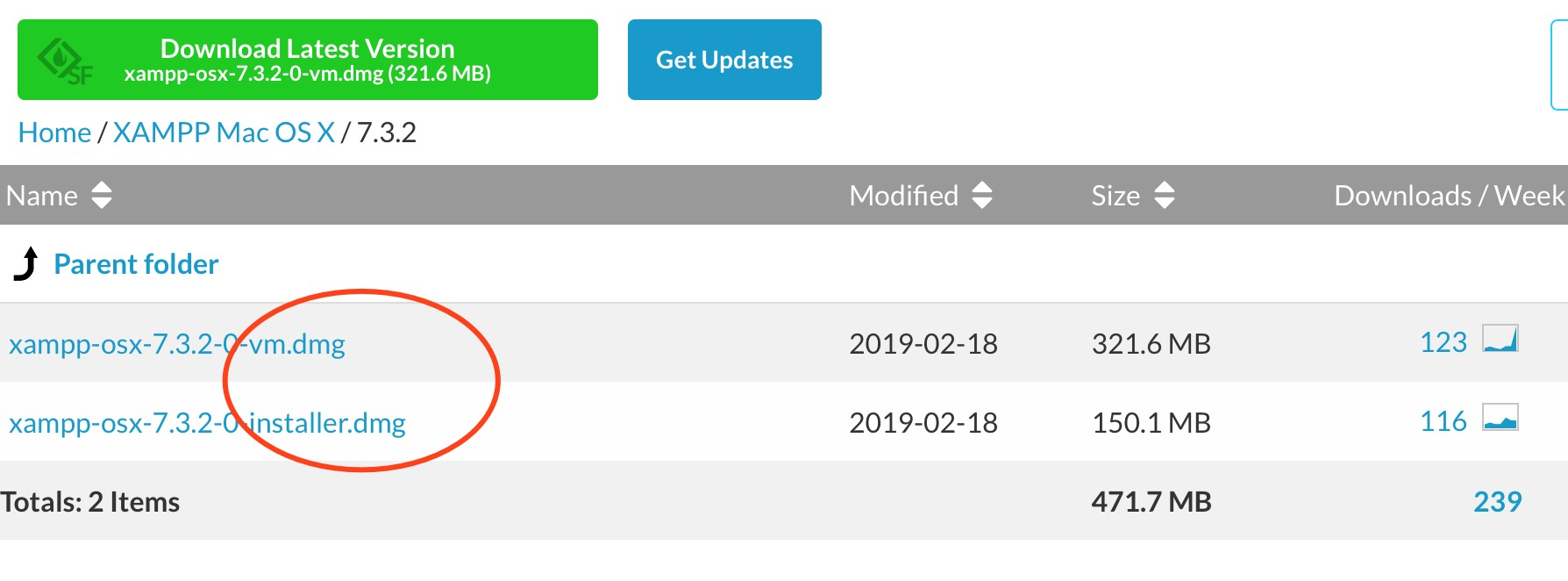
注意:这里要下载-installer.dmg的安装,不要下载-vm.dmg的安装。

否则,会造成XAMPP安装后界面不一样

二、问题整理

问题一、mac XAMPP mysql无法启动的问题

可能原因一:/Applications/XAMPP/xamppfiles/xampp文件问题。

解决方法:
1、打开/Applications/XAMPP/xamppfiles/xampp进行编辑
2、找到这一行:$XAMPP_ROOT/bin/mysql.server start > /dev/null &
3、添加如下一行在找到的那一行上面:unset DYLD_LIBRARY_PATH
然后启动mysql,如果无效果跳到解决方法二

可能原因二:mysql进程已经存在

解决方法:杀死与mysql有关的进程后,重新尝试启动mysql

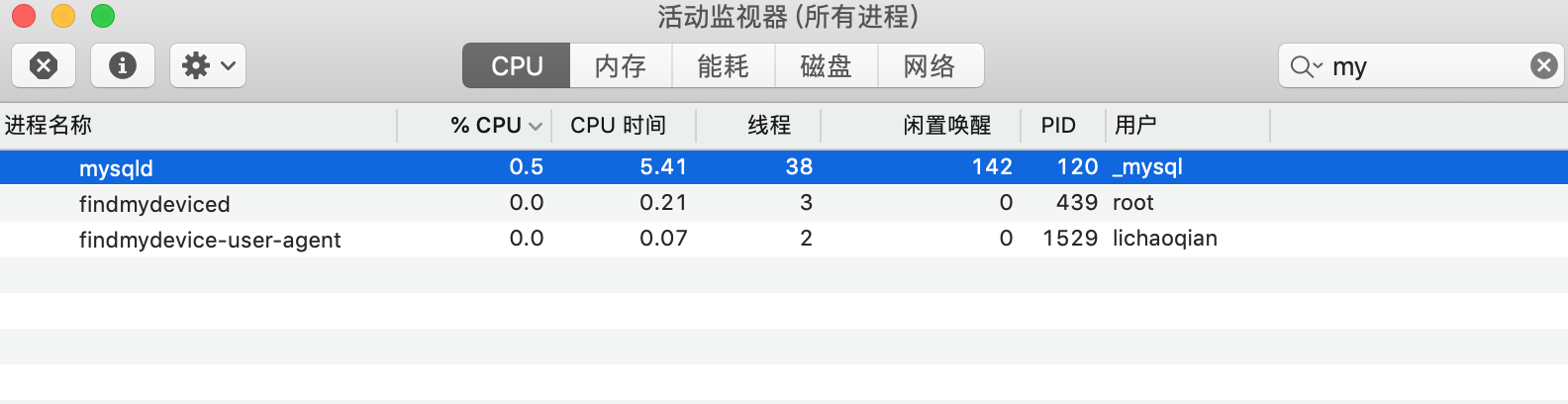
方法一:打开终端,输入ps aux | grep mysql,拿到进程号pid(如这里是pid=120)后,执行杀死进程的命令kill -9 进程号即如 kill -9 120即可重新启动mysql。
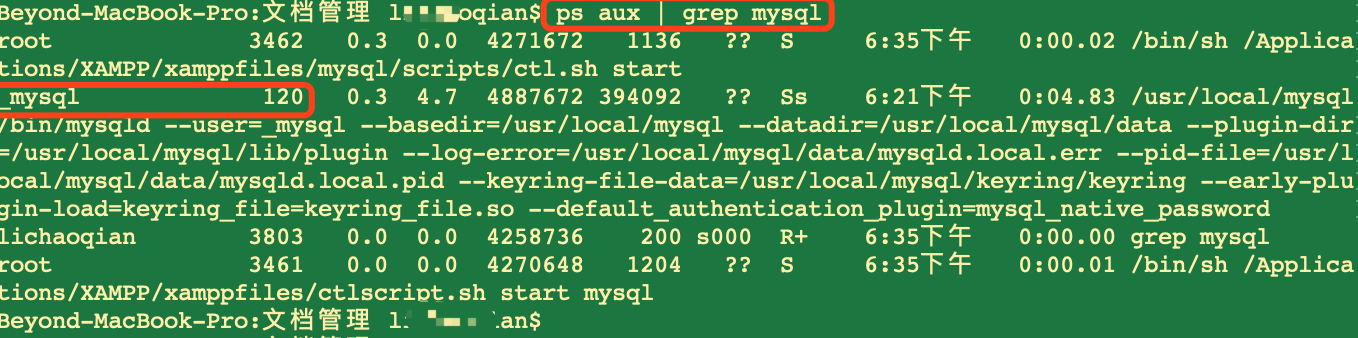
image-20190304220653289方法二:打开活动监视器,搜索mysql,关闭对应进程即可。
image-20190304183828300

mysql进程关不掉

有时候如果你发现活动监视器关掉mysql后,又自己生成了,而造成你的mysql一直关不掉,那么请检查是不是你开着如下的mysql。那么我们关掉后即可。
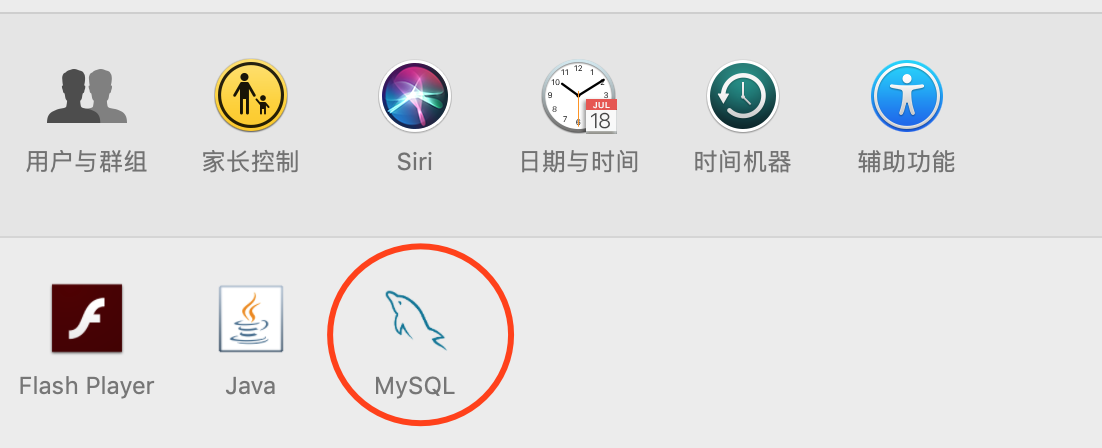
image-20190304223329375

image-20190304223959685